|
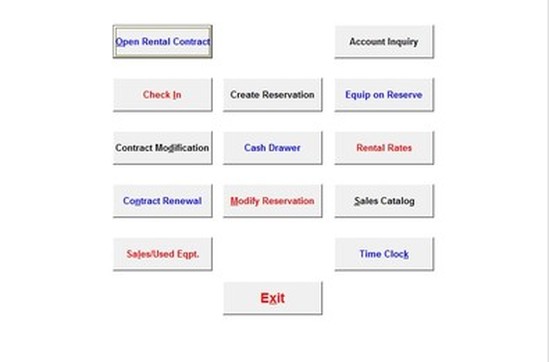
Front Counter Operations allow you to
-Open Rental Contract -Check In Equipment -Modify Contracts -Contract Renewal -Sales/Used Equipment Rates -Create Reservation -Open Cash Drawer -Modify Reservation -Account Inquiry -Equipment on Reserve -Rental Rates -Sales Catalog -Time Clock |
|
|
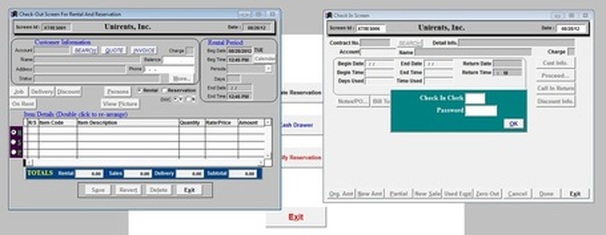
When you click on OPEN RENTAL CONTRACT a check out screen will pop up allowing you to rent out equipment
When you click on CHECK IN a check in screen will open allowing you to close a contract |
- Work Order (In-house/Outside)
- Ouote to contract conversation
- Customer Credit Alert
- Re-print Open/Close
- Bad Guy Warnings
- Package or Kit Rentals
- Lost or Missed Rental Sales
- Closed Contract Conversion to Quote/Reservation/Contract
- Unlimited Pages of Safety Messages Attachment to the Contract
- Long Term Contract Re-Billing
- Ouote to contract conversation
- Customer Credit Alert
- Re-print Open/Close
- Bad Guy Warnings
- Package or Kit Rentals
- Lost or Missed Rental Sales
- Closed Contract Conversion to Quote/Reservation/Contract
- Unlimited Pages of Safety Messages Attachment to the Contract
- Long Term Contract Re-Billing
|
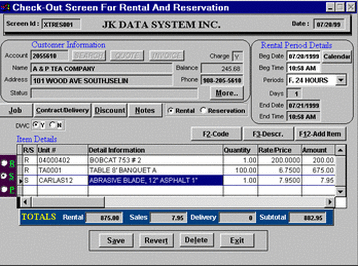
Check Out screen allows you to write a rental contract, reservation, and sales. Also you can add delivery information etc. Everything is on your fingertip! |
|
|
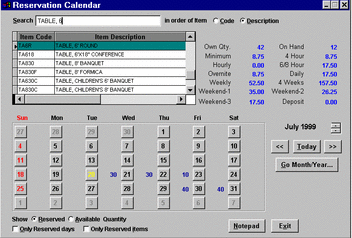
Reservation calendar option allows you to look up information on the availability of items, and to whom items are reserved/rented to. |